

Editor’s note: This review is based on testing conducted in July. The product has continued to evolve since then, so some capabilities or limitations described below may have changed.
What is SuperPlane?
SuperPlane is an open source tool, still in beta, that sits in the middle. On one side, you have the tools you already use, like Git, your CI, your cloud, and your monitoring. On the other, you have your actual infrastructure. SuperPlane sits between them.
The way it works is that you build a small graph of steps. Something like “deploy this,” then “wait for someone to approve,” then “check a metric,” then “send a message.” SuperPlane runs that graph for you, and it keeps running even if something restarts in the middle. You can also drop a human step anywhere you want, so nothing happens without approval unless you allow it.
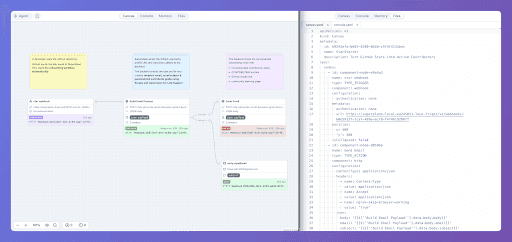
The part we liked from the start is that each app is just files in Git. There is a
canvas.yamlconsole.yamlThe reason we care about this kind of tool at all is simple. In most teams, the “glue” between people and infrastructure is a mess of small scripts and things that only one person really understands. SuperPlane turns that glue into something you can see, control, and improve as a team.
How We Tested SuperPlane: Two Real Workflows
Here is the thing, though: one workflow doesn't tell you much. If you only build the happy path, of course it works. You only find the real problems when you push a tool in both directions.
So we built two workflows, and we made them go opposite ways. Both of them talk to DigitalOcean, because that is the cloud we had a token for. One workflow sends commands out to the infrastructure. The other one reacts to something happening in the infrastructure. That is the full loop, and building both of them is where we actually learned something.
Workflow 1: A Guarded DigitalOcean Deployment Pipeline
The first one is a deployment with some rules around it. A person clicks a button to start it. Before anything reaches DigitalOcean, SuperPlane checks a few things:
- Is this the main branch? If not, stop.
- Is it during work hours, Monday to Friday, 9 to 5? If not, hold it.
- Did a human approve it? If not, wait.
Only after all three conditions are met does it actually redeploy the app on DigitalOcean, record that the deployment happened, and show it on a small dashboard.
The nice part is that each of those checks is just a small block in the file. Here is the “only during work hours” step, for example:
- name: "Business hours only" component: "timeGate" configuration: days: ["monday", "tuesday", "wednesday", "thursday", "friday"] timeRange: "09:00-17:00"
And the approval step is even shorter. This one just says, “Somebody has to approve before we continue”:
- name: "Release approval" component: "approval" configuration: items: - type: "anyone"
This is not flashy, but it solves exactly the kind of operational problem that most teams get wrong: which branch you allow, when deployments are allowed, who has to approve, and how you keep a record of what happened. Normally, this lives in someone's head or in a script full of if-statements. Here, it was just a few blocks connected together, and we could see the whole thing at a glance.
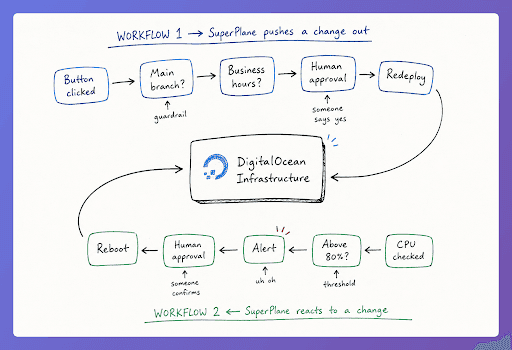
###Workflow 2: Auto-Rebooting a Droplet on a CPU Spike The second one is the opposite direction. Every few minutes, SuperPlane looks at a server's CPU. If it goes over 80 percent, it shows an alert, asks a person to approve a reboot, reboots the server, and writes down what happened.
The check itself is basically one line. This block reads the metric from the previous step and checks whether the average CPU usage is above 80 percent:
- name: "CPU above 80%?" component: "if" configuration: expression: '$["Read droplet metrics"].data.avgCpuUsagePercent > 80'
Then you connect the “yes” and “no” paths. In SuperPlane, the lines between steps carry a channel, so a check like this has a true side and a false side:
edges: - sourceId: "CPU above 80%?" targetId: "High CPU detected" channel: "true" - sourceId: "CPU above 80%?" targetId: "Droplet healthy" channel: "false"
So the “true” path goes to the alert and reboot, while the “false” path marks the server as healthy and stops.
This is the “notice something and do something about it” pattern: the reactive half of running infrastructure and often the more challenging half to build well. Testing this workflow also showed us where SuperPlane’s event support could be expanded.
What We Liked About SuperPlane
The rules, or guardrails, are easy to add: “only from main,” “only during work hours,” and “wait for approval.” These are not things we had to code. They are just blocks you drop into the flow, and each block has a clear yes path and no path.
If your problem is people deploying whenever and however they feel like, this part alone is worth it.
You get storage and a dashboard almost for free. Each app can keep its own data, and the dashboard reads straight from that. We made a table of incidents and a “highest CPU we've seen” number without setting up a database or building a frontend. That saved us real time.
Everything is files plus an API. It is all canvas.yaml and console.yaml, with a normal draft, commit, and publish flow, like Git. We wrote the files and pushed them through SuperPlane's API.
The interface, the files, and the API are just three views of the same thing. If you like doing things as code, you will feel at home here.
SuperPlane Integrations and Advanced Features
We only built two workflows, but while we were in there, we looked at the rest of it, and there is a lot more that SuperPlane can do. A few things stood out.

First, it connects to far more than clouds. There are around 47 integrations, and they cover much of the tooling a team already uses: CI tools like GitHub and GitLab; incident and on-call tools like PagerDuty and Rootly; chat tools like Slack, Discord, and Teams; and monitoring tools like Datadog, Grafana, Prometheus, and Sentry. So a workflow does not have to stay inside one tool. A realistic one might start when an incident is opened, pull the last few deployments and some health numbers, post a summary to Slack, and open a ticket, all in one graph.
Second, there are more building blocks. You can loop over a list and run the same step for each item, and you can wait for several things to finish before moving on. That "wait for all of them" piece is how you would build something like a release that only continues once three different services are ready.
Third, there is an escape hatch for anything that does not have its own integration. There are plain HTTP and GraphQL steps, and an SSH step that runs a command on a server. It is not native, but you can reach the Kubernetes API over HTTP or run
kubectl- name: "Restart the deployment" component: "http" configuration: method: "POST" url: "https://my-cluster.example.com/apis/apps/v1/namespaces/prod/deployments/api"
It is not as clean as a native integration, but it is a practical escape hatch that means you are rarely completely stuck.
Fourth, it can call AI models in the middle of a workflow. There are blocks for Claude and OpenAI, so you could have a step summarize an incident or draft a message, and then put a human approval right after it so nothing goes out without someone reading it first. There is also a built-in assistant that helps you build and debug the workflows themselves, and the same permission rules apply whether a person or an AI agent is the one doing something.
Is SuperPlane Right for You? Requirements and Limitations
You do not have to be a developer to use SuperPlane, but you do need to understand the infrastructure you are connecting to it. You need to know about tokens and APIs, and what an app or a server actually is. You also need to understand the difference between an event, which is something being pushed to you, and polling, which is you asking again and again. That difference decides a lot about what you can and cannot build. And you should be fine with basic YAML and with thinking in terms of flows and graphs. Someone with no technical background would really struggle to set this up on their own.
Final Thoughts: Is SuperPlane Worth Trying?
SuperPlane solves a real problem. It takes the messy glue between your team and your infrastructure and turns it into workflows you can see, govern, and keep in version control. The guardrails, built-in storage and dashboards, and files-plus-API approach make it much easier to turn operational knowledge into a system the whole team can understand and use. We enjoyed working with it.
We think it gives teams a structured way to replace scattered scripts and manual coordination with visible, governed workflows. It is still a beta product with room to grow, but the foundation is already useful, and the open source version makes it possible to test that value against your own infrastructure.
If any of this sounds like a problem you are dealing with, that is the kind of thing we help teams work through at CYBERLAB. Our advice is: do not trust our write-up, and do not trust anyone's demo either. Take the open source version, connect it to something real, and push it in both directions as we did. You will learn more in one afternoon of building than in a week of reading. And if you want a hand while you test it, just reach out.