Kubernetes, often called K8s, is an open-source container orchestration platform developed by Google and later donated to the Cloud Native Computing Foundation (CNCF). Kubernetes simplifies the deployment, scaling, and management of containerized applications.
With Kubernetes, you can efficiently run and manage applications, regardless of whether they are running in on-premises data centers or in public, private, or hybrid cloud environments. It provides a flexible and scalable framework for managing complex, distributed systems with containers while abstracting much of the underlying infrastructure complexity.
The CNCF estimates that Kubernetes has a commanding 92% market share among container orchestration tools used by businesses throughout the world.
Kubernetes Cluster Architecture - Core Components
Kubernetes follows a highly modular and distributed architecture designed to manage containerized applications efficiently.
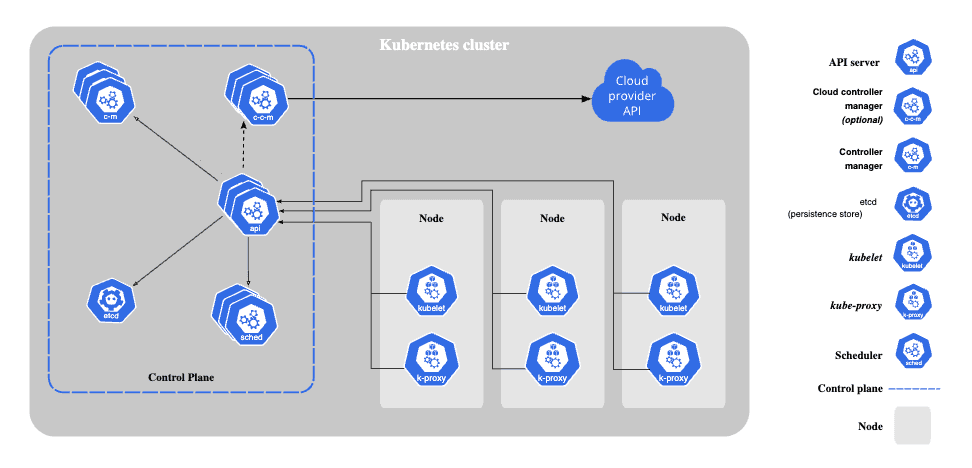
Source: https://kubernetes.io/docs/concepts/overview/components/
Cluster architecture contains the following components:
Master Node
The Master Node is responsible for managing the entire Kubernetes cluster. It includes several components:
- API Server validates and configures data for API objects that include pods, services, replication controllers, and others. It acts as the entry point for all communication with the cluster.
- Etcd is a distributed key-value store for configuration data and state information related to the cluster.
- Controller Manager watches for changes in the cluster's desired state and takes actions to bring the current state in line with the desired state.
- Scheduler assigns Pods to worker nodes, considering resource availability and constraints.
Worker Node
Worker Nodes are responsible for running containerized workloads. They include several components:
- Kubelet acts as an agent on the worker nodes, ensuring that containers are running in a Pod (the smallest deployable unit in Kubernetes). It communicates with the master node to receive and execute tasks.
- Container Runtime is the software responsible for running containers, such as Docker or containerd.
- Kube Proxy maintains network rules on the worker nodes, allowing network communication to and from Pods.
Kubernetes Workloads
Before we start explaining workloads, it is necessary to understand the basic concept of Pod. Pod is the smallest compute unit that represents a single instance of a running process in the Kubernetes. It is a fundamental building block of the Kubernetes architecture and serves as the basic unit for managing and deploying applications.
Workloads are a core concept in Kubernetes as they define how containers are deployed, scaled, and managed. Each Pod has a defined lifecycle, in case of critical failure on Node, all Pods on that Node will stop. Managing and recovering each Pod can be very difficult. Luckily, we don’t need to manage Pods directly. Workload resources will manage Pods for us.
Kubernetes provides several built-in workload resources:
- Deployment and ReplicaSet are used to manage the deployment and scaling of Pods. They ensure that a specified number of replica Pods are running at all times and can perform rolling updates to manage changes in the application.
- StatefulSets is a workload used to manage stateful applications like databases. They manage Pods that are based on an identical container spec.
- DaemonSets is responsible for running specific Pods on all nodes within a cluster. They are often used for tasks like monitoring, logging, or other node-level services.
- Job and CronJob provide different ways to define tasks that run to completion and then stop.
How to Expose Applications?
Service is a method for exposing a network application that is running inside a cluster to other applications in the cluster or to the end users across the world. They direct incoming traffic by mapping specific ports and routes to the respective endpoints or Pods. There are a few types of services:
- ClusterIP exposes service on cluster-internal IP and this service is available only for internal communication in the cluster.
- NodePort exposes service on Node ip using static port value making the application reachable outside of the cluster.
- LoadBalancer makes service publicly accessible through Cloud Provider LoadBalancer.
- ExternalName maps the service to the content of the CNAME record configured in Clusters DNS records.
When dealing with workloads that communicate over the HTTP protocol, the Ingress resource is a powerful tool for managing how web traffic is directed to these workloads. Ingress serves as the primary entry point for your Kubernetes cluster.
⚠️ Important Update (January 2026): The widely used Ingress NGINX controller, powering roughly 50% of cloud-native environments, is retiring in March 2026. After this date, it will no longer receive updates, bug fixes, or security patches, creating a significant security risk for workloads that continue using it.
Existing deployments will continue to function, but migration to alternatives, such as Gateway API or other supported Ingress controllers, is strongly recommended. This transition requires planning and engineering effort because there are no direct drop-in replacements.
You can check if your cluster relies on Ingress NGINX using:
kubectl get pods --all-namespaces --selector app.kubernetes.io/name=ingress-nginx
For more details, see the official Kubernetes statement.
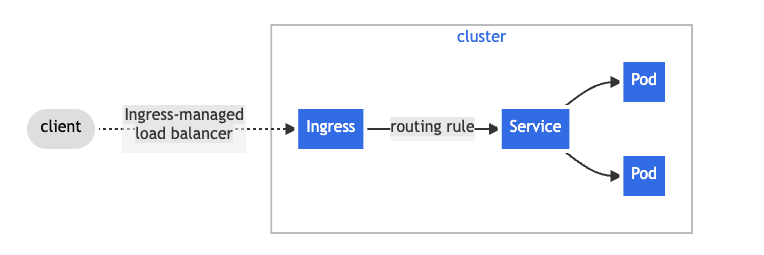
Source: https://kubernetes.io/docs/concepts/services-networking/ingress/
Data Persistence in Kubernetes
Storage is a critical component for managing the data persistence of Kubernetes applications. There is a difference between ephemeral and persistent volume types based on their lifecycle characteristics. Ephemeral volumes are tied to the lifecycle of a Pod, while persistent volumes persist beyond the Pod's existence. When a Pod terminates, Kubernetes automatically cleans up and removes ephemeral volumes, but it doesn't take the same action for persistent volumes.
Volumes are a resource for managing data within containerized applications. They address the need for persistent storage, data sharing, and data retention across the ephemeral nature of containers.
PersistentVolume (PV) is a piece of storage in the cluster provisioned by an administrator. They serve as an interface between the cluster and underlying storage systems, providing a way to claim, allocate, and manage storage that outlives the lifecycle of individual Pods.
PersistentVolumeClaim (PVC) enables applications to request and consume persistent storage. PVC consumes PV as a resource. What does the process look like?
- Pod requests the volume through the PV claim
- Claim tries to find the volume in the cluster
- Volume has the actual storage backend
StorageClass (SC) simplifies the dynamic provisioning of volumes in a cluster. This provisioning is based on StorageClasses: the PVC must request a storage class and the administrator must have created and configured that class for dynamic provisioning to occur.
Configuration Tips
How to isolate resources in one Kubernetes cluster? Use namespaces.
Namespaces are a way to create separate environments, isolate workloads, and prevent naming conflicts between resources. They are intended for use in environments with many users spread across multiple teams, or projects.
How to load environment variables in a Pod? Use ConfigMaps or Secrets.
ConfigMap is a resource that provides a way to store configuration settings, environment variables, and other configuration information in a key-value pair format.
Secret is an object that contains a small amount of sensitive data such as a password, a token, or a key. It’s very similar to ConfigMaps.
How to limit Pod resource usage in Kubernetes? Configure Requests and Limits.
Requests specify how much of each resource a container needs to be deployed on a Node. The most common resources to specify are CPU and memory (RAM). When you specify the resource request for containers in a Pod, the kube-scheduler uses this information to decide which node to place the Pod on.
Limits is a configuration parameter for containers that limit the maximum amount of CPU and memory usage per container. Kubelet enforces those limits and containers are not allowed to use more of that resource than the limit set.
Useful Commands
| Command | Description |
|---|---|
| kubectl apply -f ./my-file.yaml | Create resources. |
| kubectl create deployment | Create a new Deployment. |
| kubectl expose deployment | Create a Service for a Deployment. |
| kubectl get ns | List all namespaces. |
| kubectl get pods | List Pods in the current namespace. |
| kubectl get services | List Services in the current namespace. |
| kubectl get deployments | List Deployments in the current namespace. |
| kubectl get nodes | List all cluster Nodes. |
| kubectl delete | Delete a resource. |
| kubectl describe | Show detailed info about a resource. |
| kubectl logs | View logs from a Pod. |
| kubectl exec -it | Execute a command in a Pod. |
| kubectl get pv | List Persistent Volumes. |
| kubectl get pvc | List Persistent Volume Claims. |
| kubectl get configmap | List ConfigMaps. |
| kubectl get secrets | List Secrets. |
Conclusion
Kubernetes is an open-source, extensible, and portable container orchestration platform designed for managing containerized workloads and services efficiently. It is the ideal choice for modern, cloud-native applications, supporting multi-tenancy, quotas, and extensibility.
For more details, see the official documentation.
If you found this guide useful, check out more topics on our blog.